WhatsApp for Car Dealerships & Service Centres: Test Drives, Bookings and Service Updates
Discover how car dealerships, used-car dealers and automobile service centres can use WhatsApp to manage vehicle enquiries, qualify buyers, arrange test drives, share quotations and coordinate service appointments. Learn practical workflows for sales follow-ups, workshop updates and customer communication.
WhatsApp for Car Dealerships & Service Centres: Test Drives, Bookings and Service Updates
Vehicle buyers often contact more than one showroom before making a decision. They may ask about a model, variant, colour, on-road price, exchange option, finance process or test drive. After purchasing a vehicle, the customer may continue contacting the dealership for service appointments, repair updates, insurance information and other support.
WhatsApp for car dealerships can help vehicle dealers and automobile service centres manage these conversations through a familiar messaging channel. With a suitable WhatsApp Business Platform setup, teams can organise enquiries, collect buyer preferences, coordinate test-drive requests and share relevant service updates.
Quick answer: How can car dealerships use WhatsApp?
Dealerships can use WhatsApp to respond to vehicle enquiries, share verified model information, collect test-drive preferences, route leads to sales executives, coordinate service appointments and provide repair-status updates. Live inventory, dealer management system (DMS) data, workshop job cards and calendar availability require the relevant systems and integrations to be connected.
1. Why WhatsApp Is Useful for Car Dealerships
A vehicle purchase involves several decision points. A customer may first enquire about a model, then compare variants, ask for a quotation, arrange a test drive and discuss the next steps with a sales advisor. After delivery, the relationship continues through servicing and ownership support.
When conversations are spread across individual sales executives' phones, it can be difficult for managers to see pending enquiries or maintain continuity when staff are unavailable. A shared communication process can help keep the customer context and next action visible to authorised team members.
Common automotive use cases include:
Responding to new-vehicle and used-vehicle enquiries.
Sharing model specifications, variant details and verified brochures.
Collecting budget, purchase timeline and exchange preferences.
Coordinating test-drive requests.
Routing enquiries to the correct showroom or sales executive.
Sharing booking and delivery-stage updates.
Handling service enquiries and appointment requests.
Providing workshop status updates when the DMS or service system supplies them.
2. The Automotive Customer Journey on WhatsApp
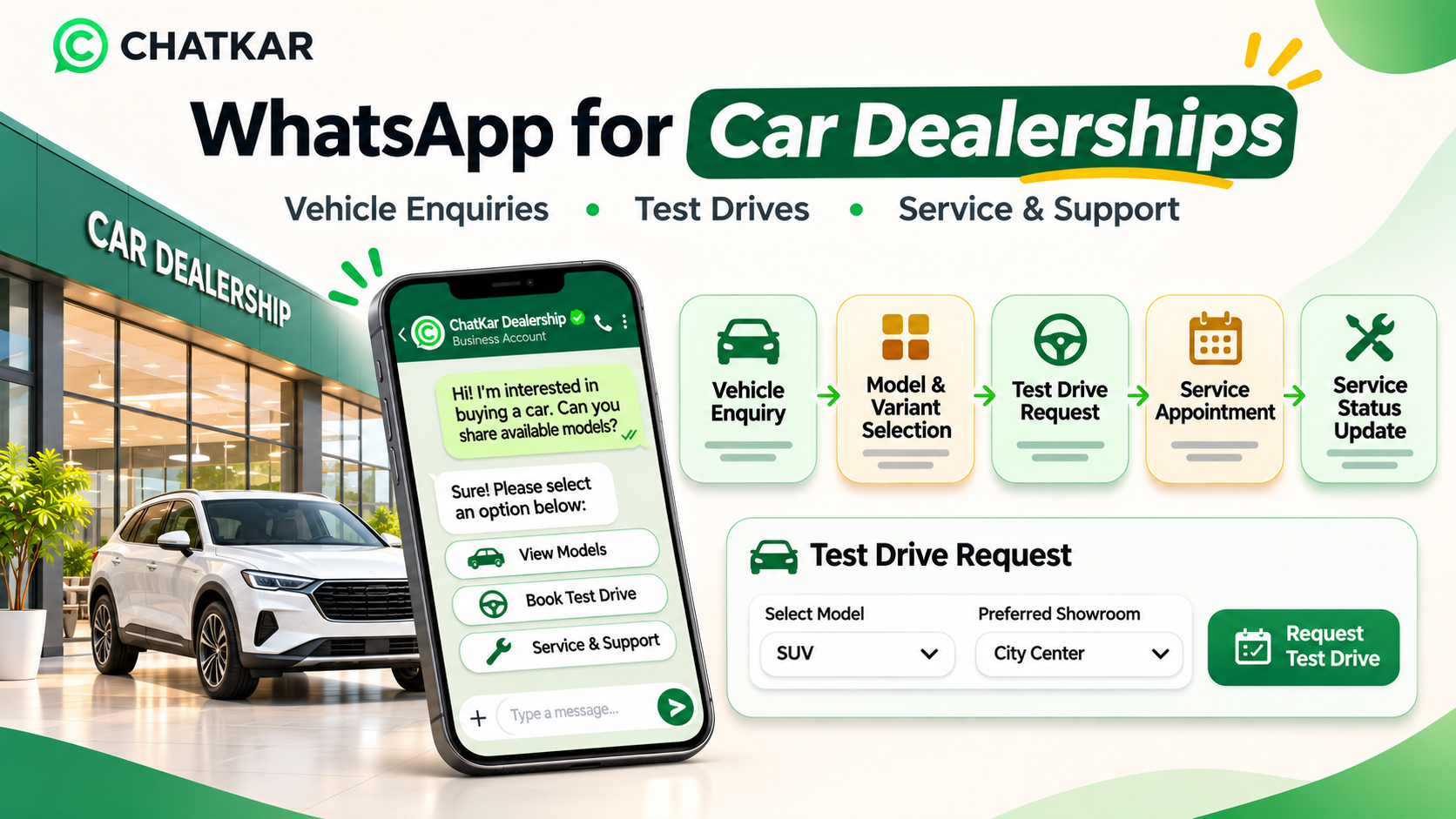
A dealership should make the next step clear at every stage. The following coding-only animation illustrates one possible journey. It is a workflow concept, not a promise that stock checks, bookings or service updates happen automatically without connected systems.
From Vehicle Enquiry to After-Sales Support
Animated workflow built with HTML and CSS. No external image is loaded.
💬1. Vehicle Enquiry
Customer asks about a model or dealership.
🚘2. Buyer Qualification
Capture model, variant and purchase preferences.
🗓️3. Test Drive
Collect a preferred slot and check availability.
🔧4. Service Request
Coordinate a workshop or maintenance appointment.
📲5. Status Update
Share verified updates and follow-up actions.
3. Capture Vehicle Enquiries from Different Channels
Dealerships can receive enquiries from websites, Click-to-WhatsApp ads, social media, vehicle listing portals, QR codes and referrals. It is useful to record the source so that the sales team knows which model, campaign or showroom the customer is asking about.
Click-to-WhatsApp Advertisements
Meta ads can open a WhatsApp conversation when a user clicks the messaging action. A dealership can use a clear call to action such as “Ask about this model” or “Request a test drive”. The first response should identify the dealership and make it easy for the customer to explain their requirement.
Dealer Website and Model Pages
A WhatsApp contact option on a vehicle or model page can help a visitor ask for specifications, availability or a test drive. Where possible, preserve the model or page context so the sales executive does not need to ask the customer to repeat the original enquiry.
Vehicle Listing Portals
Lead syncing from a vehicle listing portal depends on the portal's available APIs, permissions, commercial terms and the dealership's integration setup. A portal lead containing a phone number should not automatically be treated as WhatsApp marketing opt-in. Obtain the required permission before sending business-initiated messages.
Showroom QR Codes and Events
QR codes at a showroom, exhibition or vehicle display can open a WhatsApp conversation. Use a clear label such as “Ask about this vehicle” or “Request a test drive” and record the relevant location or campaign source.
4. Qualify Vehicle Buyers Before Assigning the Lead
A short qualification process helps the sales executive understand what the buyer is looking for. Avoid asking too many questions at the beginning. Capture enough information to route the enquiry and decide the next useful action.
Possible first-stage questions include:
Vehicle interest: car, two-wheeler, commercial vehicle or used vehicle.
Model: the model or vehicle category the person wants to explore.
Variant or configuration: the preferred variant, fuel type, transmission or body style, where relevant.
Budget range: a broad price range the customer is comfortable discussing.
Purchase timeline: immediate, within a few months or still researching.
Exchange interest: whether the customer wants to discuss an existing vehicle as part of the purchase.
Preferred showroom: the branch the customer would like to visit.
Next step: specifications, quotation discussion, callback or test-drive request.
Do not collect identity documents, bank credentials or extensive financial records through a basic promotional enquiry flow. Use the dealership's authorised and secure process for formal finance or documentation requirements.
5. Interactive Automotive Workflow Selector
Select the type of automotive business to reveal a suggested WhatsApp workflow. This is a planning example, not a live vehicle inventory or service booking system.
Which automotive business do you operate?
Suggested workflow: Model enquiry and test-drive coordination
Capture the model and variant of interest, preferred showroom, purchase timeline and test-drive preference. Verify availability and assign the enquiry to a sales executive.
Suggested workflow: Used-vehicle enquiry and inspection request
Capture the vehicle listing reference, customer questions and preferred inspection time. Verify the current listing, vehicle condition information and inspection availability before confirming.
Suggested workflow: Workshop appointment and repair updates
Collect the vehicle model, registration reference where appropriate, preferred workshop and service request. Confirm the slot and share job-status messages only when the workshop system or authorised staff verifies the update.
6. Share Model Details, Brochures and Quotations
After understanding the customer's interest, the dealership can share relevant product information. It should come from the manufacturer's or dealership's current approved source.
Useful information may include:
Official model brochure and specifications.
Variant and colour information.
Ex-showroom price and a clearly dated quotation.
On-road price breakdown, where verified for the customer's location.
Current offers and their conditions.
Showroom address and directions.
Test-drive availability or the process for requesting a slot.
Keep vehicle and pricing information accurate.
Prices, taxes, registration charges, insurance, accessories, offers and stock availability can vary by location and date. Confirm the details with the authorised dealership system before sending a quotation or promising availability. Do not present an illustrative estimate as a final on-road price.
Example: Vehicle Information Reply
Reveal a sample WhatsApp response
Hello {{name}}, thank you for your interest in {{model_name}} at {{dealership_name}}.
We can share the available model and variant information and help you arrange a discussion with a sales advisor.
Would you like to request a test drive or receive the official brochure first?
This is an example reply within an active customer service window. For business-initiated messages outside that window, use an approved template and follow the relevant Meta requirements.
7. Coordinate Test-Drive Requests on WhatsApp
A test drive lets a potential buyer experience the vehicle before deciding. WhatsApp can be used to collect a preferred model, showroom and time. The dealership must check actual vehicle and staff availability before confirming the appointment.
A practical process can include:
Ask which model or variant the customer wants to test drive.
Collect the preferred showroom or dealership location.
Ask for the preferred date and time range.
Check vehicle availability and the authorised test-drive calendar.
Confirm the slot after the dealership accepts the request.
Share the showroom address and any required instructions.
Assign a sales executive and record the outcome.
Important: A preferred time is a request, not a confirmed test drive. Automatic slot selection needs a connected calendar or dealership booking system. The dealership should also follow its own test-drive eligibility, licence-check and safety procedures.
8. Follow Up After the Test Drive
After the customer completes a test drive, the sales team may need to answer questions about the vehicle, discuss a quotation or arrange another visit. A well-organised conversation helps the customer continue without repeating information.
Possible next steps include:
Ask for feedback about the vehicle experience.
Share a verified quotation or model comparison.
Route finance questions to an authorised representative or finance partner.
Arrange a trade-in discussion where the dealership offers that service.
Schedule another showroom visit if requested.
Record the buyer's decision stage and preferred follow-up.
Do not guarantee loan approval, exchange value, discounts or delivery dates unless the relevant authorised party has confirmed them.
9. Manage Booking, Delivery and Vehicle Handover Updates
After a buyer places a booking, the dealership may need to communicate about the booking record, documentation, vehicle allocation, delivery planning and handover. The message should reflect the actual status maintained by the dealership's system.
Potential update stages include:
Booking request received.
Booking accepted or recorded.
Documentation step or action required.
Vehicle allocation or expected delivery update.
Pre-delivery inspection coordination.
Handover appointment details.
Only send a status as confirmed after the authorised dealership system or responsible team has verified it. For automated updates, connect the WhatsApp workflow to the relevant DMS, CRM or order system and test its event mapping.
10. WhatsApp for Service Centres and Workshops
The customer relationship continues after vehicle delivery. Service centres receive questions about appointment availability, periodic maintenance, repair estimates, job status and vehicle pickup. WhatsApp can provide a convenient communication channel for these requests.
Possible service workflows include:
Service Appointment Requests
Collect the vehicle model, preferred workshop, service requirement and preferred date. Check the workshop calendar and bay capacity before confirming the booking.
Service Due Communication
A dealership may remind an owner about a scheduled service where the business has the appropriate permission and message template. The reminder should be based on verified service records, not an assumed due date.
Job-Card Status Updates
When a vehicle is received, an estimate is prepared or a job is completed, the workshop system may provide an event that can trigger a relevant customer update. This requires DMS or workshop-system integration and accurate status mapping.
Estimate and Approval Discussion
Service advisors can explain a repair estimate and ask the customer to follow the dealership's authorised approval process. The team should keep the final estimate, approval and payment records in the official workshop system.
Ready-for-Pickup Notification
A pickup message should only be sent after the workshop confirms that the vehicle is ready. Include the correct branch and collection instructions.
11. Organise Sales and Service Conversations
Dealerships may have separate teams for new-vehicle sales, used vehicles, service, spare parts and customer support. A shared inbox or CRM workflow can help route requests to the correct group and preserve the conversation history.
Request type
Suggested owner
Next action
New vehicle enquiry
Sales team
Understand model interest and assign a sales advisor.
Used vehicle enquiry
Pre-owned sales team
Verify listing details and inspection availability.
Test-drive request
Showroom coordinator
Check vehicle, staff and calendar availability.
Quotation request
Sales advisor
Prepare a verified, location-specific quotation.
Service appointment
Service advisor
Check workshop capacity and confirm the slot.
Repair-status enquiry
Workshop coordinator
Verify job-card status and provide an accurate update.
Complaint or escalation
Authorised customer support
Record the issue and assign a responsible owner.
Every active conversation should have an owner and a next action. A customer should not need to repeat their vehicle details when a conversation is moved from sales to service.
12. WhatsApp Consent, Templates and Customer Communication Rules
Dealerships should treat WhatsApp as a permission-based communication channel. A person sharing their phone number for a vehicle enquiry, service booking or delivery does not automatically agree to receive every future promotional campaign.
Obtain Appropriate Opt-in
Meta's Business Messaging Policy requires the business to have the person's number or username and opt-in permission before contacting them. Make the purpose of the communication clear and honour requests to stop or opt out.
Use Approved Templates for Business-Initiated Messages
On the WhatsApp Business Platform, business-initiated conversations require approved message templates. Use each template for its approved purpose. Outside the 24-hour customer service window, free-form messages cannot be used to initiate a business conversation.
Understand the 24-Hour Customer Service Window
When a customer messages the dealership, a 24-hour customer service window opens and resets with each new user message. During that window, free-form replies are allowed. Outside it, business-initiated messages require approved templates.
Separate Transactional Updates from Promotions
An order, test-drive or workshop update should remain focused on the customer's specific transaction or request. A festive offer, vehicle launch promotion or cross-sell message has a different purpose. Do not combine unrelated marketing content with a transactional notification to try to change its category.
Protect Customer Documents
Finance applications, identity documents, bank details and vehicle ownership records should be handled through the dealership's authorised secure process. Do not collect unnecessary sensitive information through a general marketing form or share it with unauthorised team members.
Provide Human Support
When automation is used during the customer service window, Meta's policy requires a clear and prompt escalation path to a human agent or another direct support channel. Customers should be able to reach a sales or service advisor when their question requires personal assistance.
13. Interactive Automotive Communication Checklist
Use this checklist to review your dealership's WhatsApp process.
14. Interactive Knowledge Check
Test your understanding of dealership enquiry and service workflows.
Question 1: A buyer shares a phone number on a vehicle listing portal. Can the dealership automatically send WhatsApp marketing messages?
Incorrect. An enquiry or phone number alone does not establish WhatsApp marketing opt-in. Obtain the required permission first.
Correct. Record the permission and the relevant message preferences before sending business-initiated messages.
Incorrect. Automation does not remove the consent requirement.
Question 2: A customer requests a test drive for Saturday at 11 AM. What should the dealership do next?
Incorrect. A requested slot should be checked against vehicle and staff availability before confirmation.
Correct. Confirm only after the authorised dealership process accepts the request.
Incorrect. The message must reflect actual test-drive availability.
Question 3: When should an automated vehicle repair update be sent?
Incorrect. A timer alone does not prove that the repair has reached a particular stage.
Correct. The message should be based on a reliable job-card or workshop status.
Incorrect. Do not send an unverified repair update.
15. How ChatKar Can Support Automotive Communication
ChatKar's current website lists capabilities including a shared team inbox, Flow Builder, AI agents, WhatsApp campaigns, appointments, catalogs and integrations. These capabilities can provide building blocks for dealership communication workflows, subject to the connected systems and account configuration.
Possible applications include:
Team inbox: organise sales and service conversations for authorised team members.
Contact records and notes: keep relevant customer context and follow-up information alongside conversations.
Flow Builder: design configured enquiry, routing and follow-up workflows.
Appointments: collect appointment preferences and coordinate slots through the configured calendar connection.
Catalog and storefront: support eligible product browsing and related customer enquiries where the use case complies with Meta policies.
API and integrations: connect an external DMS, CRM or workshop system when a suitable integration is implemented.
Do not assume that a specific manufacturer DMS, vehicle inventory, workshop job card, insurance database or finance system is automatically connected. Confirm the required API, permissions, data mapping and error handling before promising automatic updates.
Manage Automotive Customer Conversations with ChatKar
Explore shared inbox, workflow automation, appointments and customer communication capabilities for your dealership or service business.
16. Frequently Asked Questions About WhatsApp for Car Dealerships
1. How can car dealerships use WhatsApp?
Dealerships can use WhatsApp to respond to vehicle enquiries, share model information, collect test-drive requests, route customers to sales advisors and coordinate after-sales communication.
2. Can customers book a test drive through WhatsApp?
Customers can request a test drive and share their preferred model, showroom and time. To confirm a live slot automatically, the workflow needs a connected calendar or dealership booking system that checks availability.
3. Can WhatsApp share vehicle brochures and price lists?
Yes. Businesses can share supported documents and links. Verify the brochure, variant details, pricing date, location and offer conditions before sending.
4. Can a dealership connect WhatsApp to its dealer management system?
It may be possible through an available API, webhook, connector or custom integration. The exact DMS, data fields, permissions and implementation must be verified with the system provider.
5. Can service centres send automatic service reminders?
A workflow can send reminders when an authorised service record provides the due date and the business has the required messaging permission. The system must use the correct template and message purpose.
6. Can customers receive repair-status updates on WhatsApp?
Yes, when the dealership or workshop has a reliable process that provides status changes. Automated messages should be triggered from verified job-card or workshop events.
7. Can used-car dealers use WhatsApp for enquiries?
Yes. Used-car dealers can respond to listing enquiries, share verified vehicle details, collect inspection requests and coordinate appointments. Current listing availability and condition information should be checked before being confirmed.
8. Can multiple showroom branches manage one WhatsApp number?
A suitable shared inbox and routing configuration can help multiple authorised team members manage conversations. Branch-level assignment and access controls depend on the platform setup.
9. Can a dealership send offers to previous buyers?
Promotional messages can be sent to eligible contacts who have opted in to receive marketing communication. Use approved templates when required and respect opt-out requests.
10. Can ChatKar automatically sync all vehicle and workshop information?
Do not assume this by default. ChatKar lists API and integration capabilities, but automatic inventory, DMS, workshop and job-card syncing requires a specific supported or custom integration that must be implemented and tested.
Final Thoughts
WhatsApp can help car dealerships manage more of the customer relationship in one communication channel, from the first vehicle enquiry to a test-drive request and later service interaction. The value comes from clear ownership, accurate information and a reliable next step—not simply sending more messages.
Start with a simple process: capture the enquiry, record its source and permission, understand the vehicle requirement, assign a sales advisor and confirm the next action. Then add test-drive scheduling, service reminders and workshop updates after the relevant calendars and dealership systems are connected and tested.
Use WhatsApp to make the customer experience more organised while keeping vehicle information, appointments and service-status messages tied to verified dealership records.
Important: WhatsApp policies, vehicle product availability and integration capabilities can change. Verify current Meta requirements and the exact CRM, DMS, calendar and workshop integrations available to your dealership before deploying a customer-facing workflow.
#WhatsApp for Car Dealerships#Automotive WhatsApp Marketing#WhatsApp for Automobile Industry#Vehicle Lead Generation#Test Drive Booking#WhatsApp Service Reminders#Automotive CRM#Car Dealer Automation
Join thousands of businesses running customer journeys across eleven live channels. Self-host on your own infrastructure or launch on our managed cloud.