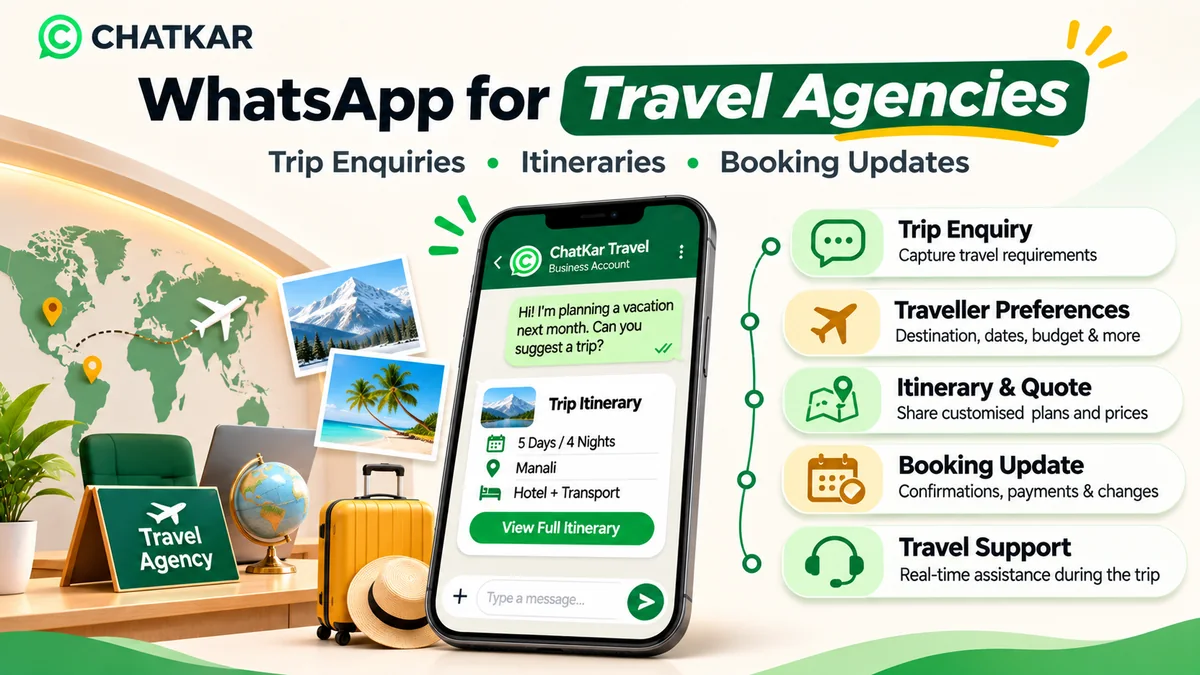
WhatsApp for Travel Agencies & Tour Operators: Trip Enquiries, Itineraries, Booking Updates & Traveller Support
Discover how travel agencies and tour operators can use WhatsApp to manage trip enquiries, understand traveller preferences, share customised itineraries, coordinate bookings and provide travel updates. Explore practical workflows for holiday packages, group tours and traveller support.
WhatsApp for Travel Agencies & Tour Operators: Trip Enquiries, Itineraries, Booking Updates & Traveller Support
Planning a trip usually involves more than choosing a destination. Travellers ask about dates, group size, budget, hotel options, transport, inclusions, cancellation terms and documents. Once a trip is booked, they may need itinerary changes, pickup details or support while travelling.
WhatsApp for travel agencies can help organise these conversations in one familiar channel. Travel agents and tour operators can collect trip requirements, discuss itinerary options, share quotes and booking documents, coordinate updates and route questions to the right team member.
Quick answer: How can travel agencies use WhatsApp?
Travel agencies can use WhatsApp to respond to trip enquiries, understand traveller preferences, share itinerary proposals, coordinate booking steps, send trip-related updates and provide customer support before and during travel. Actual availability, pricing, reservations and payment status must be verified in the agency's booking or supplier systems.
1. Why WhatsApp Is Useful for Travel Agencies
Travel decisions often happen through several conversations. A traveller may start with a broad question, compare two destinations, request a customised itinerary, discuss hotel choices and then ask for a final quote. After booking, the same traveller may need a voucher, pickup information or help with a schedule change.
When these conversations are spread across personal phones, emails and spreadsheets, it becomes harder for an agency to see what has been promised and what is still pending. A shared communication process can make enquiries easier to assign and follow up.
Common use cases include:
Responding to domestic and international trip enquiries.
Collecting travel dates, destination preferences and group size.
Understanding budget range and preferred travel style.
Sharing itinerary proposals, inclusions and exclusions.
Coordinating booking requests and payment steps.
Sending booking confirmations and travel documents.
Sharing pre-departure reminders and pickup details.
Handling traveller questions and trip-related support.
Managing post-trip feedback and future communication preferences.
2. The Travel Customer Journey on WhatsApp
A travel workflow should keep each stage clear: enquiry, planning, quote, booking, pre-departure and support. The following coding-only animation illustrates a typical journey. It does not imply that bookings, supplier availability or payments happen automatically without connected systems and staff confirmation.
From Trip Enquiry to Traveller Support
Animated workflow built with HTML and CSS. No external image is loaded.
💬1. Trip Enquiry
Traveller shares destination and trip idea.
🧭2. Preferences
Capture dates, group size and budget range.
🗺️3. Itinerary & Quote
Prepare a plan using verified supplier information.
🧾4. Booking
Verify reservations, terms and payment status.
🛟5. Trip Support
Share relevant updates and assist travellers.
3. Capture the Right Details Before Preparing a Quote
A travel enquiry that only says “Need a package for Goa” or “Suggest Europe tour” is not enough to prepare a useful proposal. A short qualification process helps an agent understand the requirement without overwhelming the traveller.
Useful first-stage questions include:
Destination: preferred city, country or type of holiday.
Travel dates: planned departure and return dates, or approximate month.
Traveller count: number of adults and children, where relevant.
Budget range: a broad expected spend per person or for the group.
Trip style: leisure, adventure, family holiday, business travel or pilgrimage.
Trip duration: preferred number of days or nights.
Departure city: where the journey is expected to begin.
Next step: sample itinerary, callback or detailed quotation.
Do not ask for passport numbers, Aadhaar numbers, full payment-card numbers or other sensitive identifiers in a general WhatsApp enquiry. Collect required travel identity details through the agency's secure and authorised booking process or through the relevant airline, hotel or travel supplier's approved channel.
4. Interactive Trip Requirement Selector
Select a trip type to see a suggested first-stage enquiry process. This is a planning example, not a live quotation engine or travel booking system.
What type of trip is the traveller planning?
Suggested workflow: Family trip planning
Ask about destination, travel dates, number of adults and children, trip duration and preferred budget range. Clarify the family's preferred pace and share suitable itinerary options after checking supplier availability.
Suggested workflow: Group tour enquiry
Capture the group size, departure city, dates, destination, accommodation preferences and whether the group needs a customised or scheduled itinerary. Assign a travel consultant to prepare the proposal.
Suggested workflow: Business travel request
Capture traveller count, route, travel dates, flexibility and company booking contact. Route the request to the authorised corporate travel desk and follow the organisation's approval process.
5. Share Itineraries, Inclusions and Travel Quotes
Once an agent understands the requirement, the next step is to prepare a proposal. A useful itinerary should make it easy for the traveller to understand what is included, what is not included and which details still need confirmation.
A travel proposal may cover:
Destination and travel dates.
Day-wise itinerary and planned activities.
Hotel or accommodation category and stay details.
Transport, transfers and pickup arrangements.
Flight or rail details, where applicable and verified.
Meals, sightseeing and activity inclusions.
Exclusions, taxes and optional activities.
Price validity, payment schedule and booking conditions.
Cancellation, amendment and refund terms.
Keep every quote accurate and time-bound.
Travel prices and availability can change before suppliers confirm the reservation. State when a quote was prepared, how long it is valid, which components are confirmed and which remain subject to availability. Do not describe a proposed itinerary or unconfirmed room as a confirmed booking.
Example: Itinerary Sharing Message
Reveal a sample WhatsApp response
Hello {{name}}, thank you for sharing your travel requirement.
We have prepared a proposed itinerary for {{destination}} based on your preferred dates and group size. It includes the suggested schedule, accommodation category, transport details, inclusions and exclusions.
Please review the proposal and let us know whether you would like any changes. All prices and availability remain subject to supplier confirmation until the booking is confirmed.
This is an example reply within an active customer service window. For business-initiated messages outside that window, use an approved template and follow the relevant Meta requirements.
6. Coordinate Booking and Payment Steps
Once the traveller accepts a proposal, the agency may need to check supplier availability, collect the required booking details, secure reservations and confirm payment. WhatsApp can help coordinate the conversation, but the actual booking record should remain in the agency's authorised booking system or with the supplier.
A practical booking process can include:
Confirm the traveller's selected itinerary and dates.
Recheck flight, hotel, vehicle and activity availability with the relevant suppliers.
Explain the final price, taxes, inclusions, exclusions and cancellation conditions.
Share the agency's secure booking or payment process.
Verify payment status in the payment gateway or accounting system.
Receive supplier confirmation and record the booking reference.
Send a clear booking confirmation after the relevant services are confirmed.
Never ask travellers to send full card numbers, card security codes, banking passwords or other payment credentials in chat. Use an authorised payment gateway or secure checkout process. A payment link being sent is not proof that payment has been completed.
7. Send Booking Confirmations and Travel Documents
After the supplier or booking system confirms the reservation, the agency can share relevant documents and details through the appropriate communication channel. Depending on the trip, this may include:
Booking confirmation and reference number.
Itinerary and schedule.
Hotel or accommodation voucher.
Flight or rail ticket information, where issued.
Transfer and pickup instructions.
Emergency or on-trip contact details.
Supplier terms and cancellation information.
Before sending a document, verify the traveller name, dates, route, booking reference and other key information. Send documents only to the intended recipient and restrict internal access to staff who need them.
8. Pre-Departure Reminders and Traveller Preparation
A few clear reminders can help travellers prepare for a trip. The content and timing should match the actual booking and the destination's requirements.
Examples include:
Departure date and reporting time reminder.
Airport, station or pickup location details.
Hotel check-in information.
Transfer contact and meeting point.
Weather or packing information from a reliable source.
Travel insurance or document checklist reminders.
Supplier contact details and support instructions.
Visa, entry, health, insurance and border requirements can change. Direct travellers to the relevant government, airline, embassy or supplier source and avoid presenting general information as a personal eligibility decision.
9. Support Travellers During the Trip
Travel support is not limited to sending booking documents. Travellers may contact the agency if a pickup is delayed, a hotel cannot locate a reservation, a flight schedule changes or they need clarification about the itinerary.
A good support workflow should include:
A monitored contact channel during the agency's stated support hours.
Clear instructions for urgent issues and after-hours assistance.
Access to the relevant booking reference and supplier contact details.
A human handover for schedule changes, cancellations and disputes.
Accurate communication based on verified airline, hotel or operator updates.
A record of the issue, owner and resolution.
Do not promise that a travel agency can resolve every airline, immigration, weather or supplier disruption directly. Explain what the agency can do, who controls the service and what the traveller should do next.
10. Manage Enquiries Across the Travel Team
As an agency grows, enquiries may need to move between sales, ticketing, visa support, hotel reservations, operations and emergency assistance. A shared inbox and CRM workflow can help maintain context and make responsibilities visible.
Request type
Suggested owner
Next action
New trip enquiry
Travel sales consultant
Capture destination, dates, traveller count and budget range.
Itinerary request
Itinerary planner
Prepare a proposal and verify supplier information.
Quote or amendment
Assigned travel consultant
Recheck price, validity and availability.
Booking and payment
Reservations or accounts team
Verify supplier and payment status.
Pre-departure question
Travel operations
Share accurate trip-specific instructions.
During-trip issue
On-trip support owner
Verify the issue and coordinate with the relevant supplier.
Post-trip feedback
Customer experience team
Record feedback and handle any unresolved issue.
Every active conversation should have an owner and next action. If an enquiry moves from sales to operations, the new owner should be able to see the relevant conversation history and booking context without asking the traveller to repeat everything.
11. WhatsApp Consent, Templates and Traveller Data Protection
Travel agencies may hold contact details, itineraries and booking information. They should use WhatsApp responsibly and keep sensitive booking or identity data inside appropriate secure systems.
Obtain the Required WhatsApp Opt-in
Meta's Business Messaging Policy requires a business to have the person's phone number or username and opt-in permission before contacting them. The person should understand which messages they are agreeing to receive. Respect requests to block, discontinue or opt out of communication.
Use Approved Templates for Business-Initiated Messages
On the WhatsApp Business Platform, a business can initiate a conversation using an approved message template. Within the 24-hour customer service window after a user message, free-form replies are permitted. Outside that window, business-initiated messages must use approved templates.
Keep Booking Updates Separate from Promotions
A message about an existing booking, departure time or itinerary change should relate to the traveller's actual booking. A new holiday offer or promotional package is marketing communication and must follow the applicable opt-in and template requirements. Do not label a promotion as a utility message to reduce restrictions or charges.
Do Not Collect Sensitive Identifiers or Payment Credentials in Chat
Do not ask travellers to send full payment-card numbers, financial account numbers or personal ID numbers through WhatsApp. Use the agency's secure booking form, an authorised supplier portal or the appropriate official check-in process for identity and payment details.
Use Secure Systems and Limit Access
Keep booking documents and personal information accessible only to authorised team members. Share only the information a traveller needs for the next step and do not forward one customer's private booking information to another traveller.
Check Commerce-Feature Eligibility Before Selling Travel Services in WhatsApp
Meta's Commerce Policy governs the use of commerce features such as catalogs and payments. Do not assume that a tour, hotel stay, airline service or travel package can be listed or sold through every WhatsApp commerce feature. Review the current Commerce Policy and the specific eligibility of the account and service before using an in-WhatsApp catalog or payment experience for travel services. A conversation can still be used to discuss trip requirements, answer questions and coordinate a booking process, subject to the Business Messaging Policy.
Use this checklist to review your enquiry-to-travel support process.
13. Interactive Knowledge Check
Test your understanding of a responsible travel-agency WhatsApp process.
Question 1: A traveller asks for a quote for a family holiday. What details are most useful to collect first?
Incorrect. Do not collect sensitive identity or payment details in a basic enquiry chat. Start with destination, dates, group size and budget range.
Correct. These details help the agent understand the requirement without asking for unnecessary sensitive information.
Incorrect. Never request banking passwords or credentials in WhatsApp chat.
Question 2: An agent sends an itinerary proposal. Is the trip automatically booked?
Incorrect. A proposal is not a confirmed booking. Supplier availability and reservations must be verified.
Correct. Confirm only after the relevant booking and payment steps are verified.
Incorrect. A read receipt does not confirm a booking.
Question 3: Where should an agency collect passport and full payment-card details?
Incorrect. Do not ask travellers to share personal ID numbers or full card numbers in chat.
Correct. Use an appropriate secure form, supplier portal or official booking process.
Incorrect. A group chat is not an appropriate place for sensitive identity or payment information.
14. How ChatKar Can Support Travel Agency Communication
ChatKar's current feature page lists a unified team inbox, assignment and routing, visual Flow Builder, WhatsApp Forms, AI agents with human handoff, contact CRM, campaign analytics, appointments, REST API and webhooks. These capabilities can provide building blocks for travel-agency communication, depending on account setup and the integrations the agency implements.
Possible applications include:
Unified team inbox: organise traveller conversations across sales and support teams.
Assignment and routing: direct new enquiries to the correct travel consultant or operations team.
Flow Builder and WhatsApp Forms: collect trip preferences and guide the enquiry to the next step.
AI agents and knowledge base: answer routine questions using approved destination and itinerary information, with a human handoff when required.
Contact CRM and custom fields: organise traveller preferences, enquiry status and follow-up tasks.
Appointments and calendar: coordinate consultations or callbacks when the calendar workflow is configured.
REST API and webhooks: connect an external CRM, booking system or supplier workflow when a supported integration is implemented.
Do not assume that ChatKar automatically connects to every airline, hotel, Global Distribution System (GDS), tour operator or booking engine. Verify each integration, data mapping, supplier permission and error-handling process before promising live availability or automated booking confirmation.
Organise Travel Enquiries with ChatKar
Explore shared inbox, WhatsApp Forms, workflow automation, CRM and integration capabilities for your travel business.
15. Frequently Asked Questions About WhatsApp for Travel Agencies
1. How can travel agencies use WhatsApp?
Travel agencies can use WhatsApp to handle trip enquiries, collect travel preferences, share itinerary proposals, coordinate booking steps, send trip-related updates and assist travellers before and during a journey.
2. Can a travel agency send itineraries and tickets on WhatsApp?
Agencies can share supported documents and links in a conversation, subject to the relevant messaging rules and secure handling practices. Verify booking references, traveller details and document accuracy before sending.
3. Can WhatsApp automatically book flights and hotels?
Not by itself. Automatic booking requires a connected booking engine, supplier API or other authorised reservation system. Availability and booking status must be verified by the source system.
4. Can a travel agency collect passport details through WhatsApp?
Do not ask travellers to send personal ID numbers or full payment-card numbers in WhatsApp chat. Use the agency's secure, authorised booking form or the relevant supplier's official process for identity information.
5. Can travellers pay for a trip through WhatsApp?
Payment and commerce features are subject to Meta's Commerce Policy, regional availability and provider requirements. Use an approved secure payment process, and never ask a customer to send card numbers, CVV or banking credentials in chat.
6. Can a travel agency share tour packages through a WhatsApp catalog?
Do not assume that travel services can be listed or sold through every WhatsApp catalog or commerce feature. Check the current Meta Commerce Policy and account eligibility before using catalog or payment features for travel services.
7. Can WhatsApp send booking confirmations and departure reminders?
Yes, where the agency has the required opt-in, the booking information is verified and the message follows the applicable template and category rules. Business-initiated messages outside the customer service window require approved templates.
8. Can multiple travel agents manage one WhatsApp number?
A suitable shared inbox can allow authorised agents to manage conversations, assign enquiries and retain customer context. User limits and routing depend on the platform and configuration.
9. Can ChatKar connect with a travel booking system?
ChatKar lists REST API, webhooks and integration capabilities. A connection to a specific booking engine, airline, hotel supplier or GDS must be checked and implemented separately.
10. Can WhatsApp support travellers during a trip?
Yes. A travel agency can use WhatsApp for questions and trip-related support, provided that the contact channel is monitored and there is a clear handover to a human support person for urgent or complex issues.
Final Thoughts
WhatsApp can help travel agencies organise the full customer conversation, from the first trip enquiry to itinerary sharing, booking coordination and traveller support. The best process is built around accurate information, clear ownership and a reliable source of booking status.
Start with a short trip enquiry form, a clear quotation process and a shared inbox for follow-up. Add supplier integrations and automated booking updates only after the relevant booking and payment systems are connected and tested.
Use WhatsApp to make travel communication more convenient, while protecting traveller information, respecting message preferences and confirming every booking detail against the agency's authorised systems.
Important: WhatsApp policies, commerce eligibility and supplier integration availability can change. Verify current Meta requirements and the exact airline, hotel, booking-engine and payment integrations available to your agency before deploying a customer-facing workflow.
#WhatsApp for Travel Agencies#WhatsApp for Tour Operators#Travel Agency Automation#WhatsApp Travel Enquiries#Travel Booking Updates#WhatsApp Travel CRM#Itinerary Sharing#Travel Customer Support
Join thousands of businesses running customer journeys across eleven live channels. Self-host on your own infrastructure or launch on our managed cloud.