Learn how to improve WhatsApp message deliverability, maintain a healthy quality rating and manage messaging limits. Understand customer opt-in, approved templates, delivery issues, messaging restrictions and best practices for successful WhatsApp campaigns.
Sending a WhatsApp campaign does not guarantee that every message will reach the intended customer. Your business must follow WhatsApp messaging rules, maintain relevant communication, respect customer preferences and monitor the quality of its messages.
This is where WhatsApp message deliverability becomes important. It refers to the ability of a business to send messages successfully to eligible recipients while maintaining compliance with WhatsApp policies and a healthy messaging reputation.
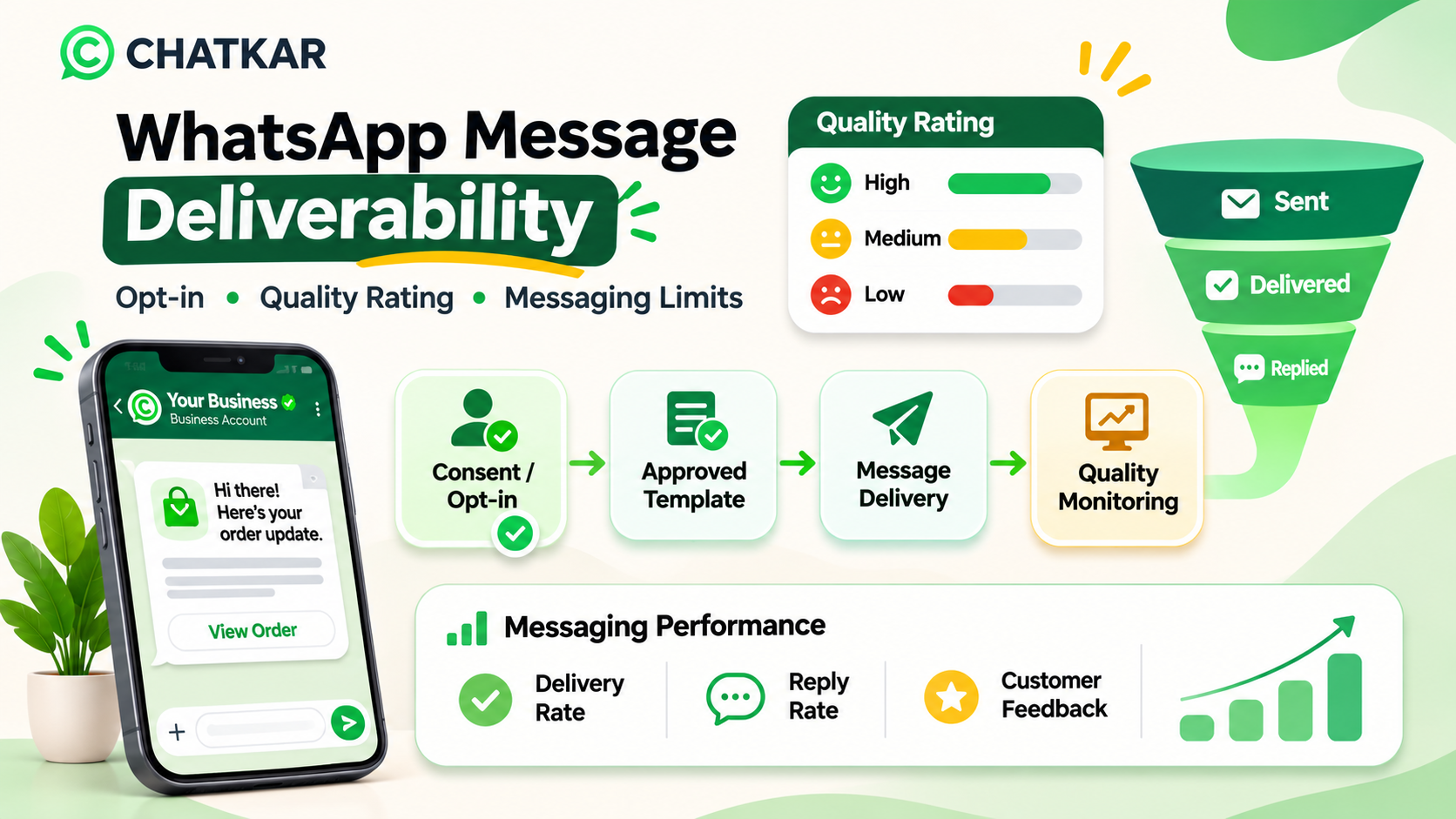
Businesses using the WhatsApp Business Platform should understand three important areas: customer opt-in, message and phone-number quality, and messaging limits. Ignoring any of these can affect campaign performance and may lead to restrictions.
Quick answer: How can you improve WhatsApp message deliverability?
Collect clear customer opt-ins, send relevant messages, use approved templates for business-initiated conversations, respect opt-outs, control message frequency and monitor your quality rating and messaging limits in WhatsApp Manager.
There is no guaranteed delivery percentage. Actual delivery depends on recipient eligibility, user settings, platform controls, message quality and other factors.
1. What Is WhatsApp Message Deliverability?
WhatsApp message deliverability describes how successfully business messages are delivered to their intended recipients.
A business might have a large contact database and an approved message template, but that does not mean every campaign will have the same delivery outcome. Messages may fail or be restricted for several reasons, including incorrect recipient details, policy violations, messaging limits, template status or recipient-side conditions.
Good deliverability is not achieved by increasing the number of messages sent. It comes from building a messaging process that customers expect and find useful.
A reliable WhatsApp messaging process should include:
Clear and valid customer opt-in.
Relevant messaging based on customer interests and activity.
Approved templates for business-initiated messages.
Reasonable campaign frequency.
Correct customer data and phone numbers.
Respect for opt-out and block requests.
Regular monitoring of quality and delivery reports.
2. Understanding WhatsApp Quality Rating
Meta provides a quality rating for WhatsApp Business phone numbers. It gives businesses an indication of how customers are responding to recent messages.
The commonly displayed quality levels are:
Explore the three quality levels
Select a rating to understand what it indicates and what your team should review.
High – Green
Your recent messaging is receiving an acceptable quality signal. Continue sending expected, timely and relevant messages.
Recommended action: Maintain your consent records, campaign relevance and current frequency controls.
Medium – Yellow
Your message quality needs attention. Review recent campaigns, recipient selection, template content and customer feedback.
Recommended action: Reduce unnecessary campaign volume, focus on engaged recipients and identify why customers may be ignoring or blocking messages.
Low – Red
Your recent messaging quality is poor. Your messaging limits may be reduced or your phone number may face restrictions if the problem continues.
Recommended action: Investigate immediately, review opt-in records, stop problematic campaigns and correct the cause before resuming normal sending.
These levels are indicators, not a guarantee of delivery. A high quality rating does not mean every message will be delivered, and a medium rating does not automatically mean that all messaging has stopped.
3. What Causes WhatsApp Quality Rating to Drop?
Customer feedback is an important signal. If people receive messages they did not expect, find irrelevant or consider repetitive, they may block or report the business.
Common causes include:
1. Sending Messages Without Proper Opt-in
Uploading a contact list or collecting phone numbers does not automatically provide permission to send WhatsApp messages. Businesses must obtain the required opt-in and keep a record of how it was collected.
2. Sending Too Many Campaigns
Repeatedly sending promotional messages can create fatigue. Even customers who initially agreed to receive messages may become frustrated when the frequency is excessive.
3. Irrelevant Messages
A customer who purchased one product may not be interested in every future promotion. Segment your audience based on genuine preferences and relevant activity.
4. Misleading Offers or Unclear Content
Messages with exaggerated claims, unclear pricing, misleading links or unexpected conditions can damage customer trust.
5. Poor Template Content
Templates that do not match the customer's expectation or contain unclear promotional language may receive negative feedback. Repeated customer complaints can affect template quality and sender reputation.
6. Ignoring Opt-out Requests
Customers must be able to stop receiving messages. Continuing to send unwanted messages after an opt-out can create policy and reputation problems.
Important: Do not try to improve deliverability by rotating phone numbers, changing providers or moving the same unwanted campaign to another sender. Correct the underlying consent, content, frequency or compliance problem.
4. WhatsApp Business Opt-in: Why It Matters
Opt-in means that the customer has given permission to receive subsequent messages or calls from your business on WhatsApp.
WhatsApp's Business Messaging Policy requires businesses to have the recipient's phone number or username and opt-in permission before contacting them. The business is responsible for obtaining consent in a way that complies with applicable laws.
Examples of ways to collect consent include:
A clearly worded opt-in checkbox on a website form.
A WhatsApp subscription option on a checkout page.
A customer selecting a WhatsApp communication preference.
A QR code that opens a WhatsApp interaction with a clear subscription request.
A customer explicitly requesting updates through WhatsApp.
The customer should understand what type of messages they are agreeing to receive.
Example of a Clear WhatsApp Opt-in
Suggested consent wording
"I agree to receive updates and relevant communication from [Business Name] through WhatsApp. I understand that I can opt out of marketing messages at any time."
Adapt this wording to the specific message categories, purpose and applicable legal requirements. This example is not a substitute for a consent or privacy review.
Maintain a Proper Consent Record
For every opted-in contact, keep useful information such as:
Customer phone number.
Date and time of consent.
Source of consent, such as website, checkout, form or QR code.
Exact consent wording or the version shown to the customer.
Message categories the customer agreed to receive.
Opt-out date and status, where applicable.
These records help your team understand why a person is on a campaign list and whether they remain eligible for the communication being sent.
5. Approved WhatsApp Message Templates and Their Quality
Businesses using the WhatsApp Business Platform must use approved message templates to initiate conversations. A template must follow WhatsApp's policies and be used for its designated purpose.
Within the 24-hour customer service window after a user message, businesses can reply without using a template. Outside that window, approved templates are required for business-initiated messages.
Meta can review, approve, reject or pause message templates. Businesses should not assume that an approved template can be used indefinitely without monitoring its quality.
What Can Damage Template Quality?
Customers frequently blocking the business after receiving the message.
Customers reporting messages as unwanted.
Sending an offer to a poorly matched audience.
Sending the same promotion repeatedly.
Using confusing or misleading content.
Using a template for a purpose different from the one for which it was approved.
Template Quality vs Phone Number Quality
These are related, but they are not the same thing.
Area
What it represents
What to review
Phone number quality rating
Feedback relating to the business phone number's recent messaging.
Audience relevance, campaign frequency, consent and customer feedback.
Template quality
How recipients respond to a particular approved template.
Template wording, message purpose, audience and frequency.
Delivery status
Whether a particular message was sent, delivered, read or failed, as reported by the platform.
Recipient eligibility, delivery events, limits and error information.
6. WhatsApp Messaging Limits Explained
WhatsApp messaging limits control how many unique customers a business can initiate conversations with during a rolling 24-hour period outside the customer service window.
It is important to understand that a messaging limit is not simply the total number of messages your business can send. It concerns the number of unique recipients that can be contacted through business-initiated messaging under the applicable limit.
Limits are assigned by Meta and can change as the business meets the applicable quality and scaling requirements.
Do Not Confuse These Different Limits
Limit or status
What it controls
Business messaging limit
How many unique customers the business can initiate conversations with during the applicable 24-hour period.
Phone number quality
A quality signal based on recent customer responses to business messages.
Template status and quality
Whether a template remains available and in good standing for sending.
API throughput or rate limits
Technical limits on the rate at which API requests or messages can be processed.
Customer service window
The period in which a business can respond to a customer's message without using an approved template.
These are separate controls. Reaching an API throughput limit, for example, is not the same as exhausting the business messaging limit.
Are Messaging Limits the Same for Every Business?
No. The limit available to a business depends on its current WhatsApp Business Platform account and Meta's applicable eligibility and scaling criteria. Do not assume that all new businesses or all phone numbers have the same limit.
Meta has also changed how messaging limits are managed. Provider documentation describes messaging limits being shared at the business portfolio level rather than independently applied to every phone number. Check the current limit shown in your own WhatsApp Manager before planning a large campaign.
Also remember that user-level controls, template controls and account restrictions can affect delivery even when your business messaging limit has not been exhausted.
7. Animated WhatsApp Deliverability Workflow
A good messaging process starts before the campaign is sent. It includes consent checks, template approval, delivery monitoring and ongoing quality improvement.
WhatsApp Message Delivery Process
An animated coding-only illustration of the message journey.
✅1. Customer Opt-in
Confirm permission and message preferences.
📋2. Approved Template
Use the right approved message for the intended purpose.
📨3. Message Delivery
Check eligibility, sending limits and delivery events.
📊4. Quality Monitoring
Review feedback and improve future communication.
This workflow is a recommended business process. It does not mean that every message will be delivered or read.
8. How to Check Your WhatsApp Quality Rating
Businesses can review their WhatsApp Business phone number information through Meta's WhatsApp Manager.
A commonly used navigation path is:
Log in to your Meta Business account.
Open WhatsApp Manager.
Go to the phone numbers section under account tools.
Find the business phone number you want to review.
Check its quality rating and status.
Review the messaging limit and any available warnings or notifications.
Also review template status in the message template management area. A phone number rating and an individual template's quality or status should not be treated as interchangeable.
Meta may update the navigation and dashboard layout. Use the current WhatsApp Manager interface and official developer documentation for the latest location of these controls.
9. How to Improve WhatsApp Message Deliverability
1. Send Messages Only to Eligible Contacts
Make sure recipients have given the appropriate permission. Remove contacts who have opted out and avoid using purchased or scraped lists.
2. Segment Your Audience
Divide contacts according to their interests, previous interactions, customer status and message preferences. A targeted message is generally more useful than sending the same promotion to everyone.
3. Control Campaign Frequency
Set sensible frequency limits for campaigns. Avoid sending several promotional reminders close together without a clear reason.
4. Write Clear and Relevant Templates
Tell customers why you are contacting them. Make the offer, service update or next action easy to understand. Avoid misleading claims and vague promotional language.
5. Keep Message Categories Separate
Use a template for its approved purpose. Do not combine an unrelated promotion with an order update and assume that the whole message will remain a utility communication.
6. Respect Opt-out Requests
Make it easy for customers to stop receiving messages and update their contact preferences when they do. Avoid sending further campaigns to people who have opted out.
7. Monitor Campaign Results
Review delivery, read and reply information where available. Compare campaign outcomes with blocks, reports, template quality and customer complaints.
8. Scale Gradually
New businesses should follow Meta's onboarding and scaling process. Start with a manageable audience, learn from the results and increase messaging activity only when the business is ready and eligible.
10. What to Do When WhatsApp Quality Rating Drops
If your rating changes from high to medium or low, do not immediately send more campaigns to compensate for poor results.
First, identify what changed. Review recent campaign activity, template feedback, the source of your contacts and the frequency of messages.
Recommended Recovery Actions
Review the phone number's current quality rating and status.
Check whether recent templates were rejected, paused or deactivated.
Review the source and validity of your customer opt-ins.
Identify campaigns with repeated blocks or negative feedback.
Stop sending to contacts who have opted out.
Reduce unnecessary campaign frequency.
Focus on recipients who have a relevant reason to receive the message.
Correct content or targeting problems before resuming usual activity.
Monitor the rating and message delivery after changes are made.
Important: No recovery method guarantees that a phone number or account restriction will be removed. Follow the official Meta enforcement and appeal process where applicable.
Use this checklist before launching a WhatsApp campaign. Tick the items your team has completed.
This is a working checklist, not a compliance certification or an automatic validation of your WhatsApp account.
12. Interactive Knowledge Quiz: Test Your WhatsApp Deliverability Knowledge
Select an answer in each question to reveal whether it is correct and why.
Question 1: Can you send promotional WhatsApp messages to a contact just because their phone number is available?
Not quite. Having a number alone is not permission to send WhatsApp messages.
Correct. WhatsApp requires the recipient's number or username and opt-in permission before the business contacts them.
Incorrect. Sending only once does not remove the opt-in requirement.
Question 2: What does a low WhatsApp quality rating indicate?
Incorrect. More volume can make the problem worse if the underlying issue is poor targeting or negative feedback.
Correct. Review consent, recipient relevance, templates and campaign frequency before scaling again.
Incorrect. A low rating can lead to restrictions, but it is not the same as a guaranteed failure of every message.
Question 3: What is generally required to initiate a WhatsApp Business Platform conversation?
Incorrect. Business-initiated conversations require an approved message template.
Correct. Outside the 24-hour customer service window, approved templates are required.
Incorrect. A previous conversation does not replace the template requirements for initiating a conversation.
13. Common WhatsApp Deliverability Mistakes
Buying contact lists: a purchased phone number list does not establish WhatsApp opt-in.
Sending too frequently: repeated promotional campaigns can lead to blocks and reports.
Ignoring template status: approved templates can still be paused or rejected later.
Ignoring customer preferences: customers should be able to opt out, and those requests must be respected.
Using misleading content: unclear offers and false claims can damage trust.
Confusing messaging limits with API throughput: these are different technical controls.
Assuming approval guarantees delivery: an approved template is not a guarantee that every recipient will receive the message.
Trying to bypass restrictions: changing the sender without fixing the underlying issue does not create a sustainable messaging strategy.
14. How ChatKar Can Support WhatsApp Campaign Management
Businesses need more than the ability to send a WhatsApp campaign. They also need a process to manage customers, organize conversations and coordinate follow-up.
ChatKar provides WhatsApp-focused communication and automation tools. Depending on the account configuration and subscribed features, businesses can use the platform's campaign capabilities, team inbox, automation and contact-management workflows to organize their communication operations.
A responsible WhatsApp campaign process should include:
Maintaining organized contact information and consent records.
Segmenting customers according to their preferences.
Using appropriate templates and message categories.
Managing campaign activity and customer replies.
Assigning conversations to the right team members.
Reviewing delivery and campaign performance information where available.
Manage WhatsApp Conversations with ChatKar
Explore WhatsApp campaigns, customer communication, team inbox and automation features to manage business messaging workflows.
15. Frequently Asked Questions About WhatsApp Message Deliverability
1. What is WhatsApp message deliverability?
WhatsApp message deliverability refers to the successful delivery of business messages to eligible recipients. It depends on recipient eligibility, platform controls, message quality, policy compliance and other factors.
2. What is WhatsApp quality rating?
It is a quality indicator associated with a WhatsApp Business phone number, based on how customers respond to recent business messaging. The commonly displayed levels are High, Medium and Low.
3. What causes WhatsApp quality rating to become low?
Unwanted messages, poor audience relevance, excessive frequency, blocks, reports and unclear consent can contribute to negative customer feedback and lower quality.
4. How can I improve my WhatsApp quality rating?
Review opt-in records, improve targeting, reduce unnecessary message frequency, send relevant content, respect opt-outs and monitor template and phone-number quality.
5. Is WhatsApp opt-in compulsory?
WhatsApp's Business Messaging Policy requires businesses to have the customer's number or username and opt-in permission before contacting them on WhatsApp.
6. What happens if a WhatsApp customer blocks my business?
Blocks and reports can contribute to negative feedback. Repeated negative feedback can affect message quality and may lead to restrictions under WhatsApp's policies.
7. What is a WhatsApp messaging limit?
It controls how many unique recipients a business can initiate conversations with during the applicable rolling 24-hour period outside the customer service window. Check the actual limit shown for your business account.
8. Are WhatsApp quality rating and template quality the same?
No. Phone-number quality reflects broader feedback about the business's messaging. Template quality relates to how recipients respond to a particular message template.
9. Can I send WhatsApp messages without an approved template?
Businesses can send free-form replies within the 24-hour customer service window after a customer message. Outside that window, business-initiated messages require an approved template.
10. Can a high quality rating guarantee message delivery?
No. A high rating is a positive quality signal, but messages may still fail because of recipient eligibility, account controls, user settings, technical issues or other platform restrictions.
11. Can WhatsApp reduce my messaging limit?
Yes. Negative feedback, low quality or policy violations can affect your ability to send messages and may result in reduced limits or restrictions.
12. How do I check my WhatsApp number quality?
Open the current WhatsApp Manager interface through your Meta Business account and review the relevant phone number under account tools or phone number management. The exact navigation may change.
Final Thoughts
WhatsApp message deliverability is not simply about sending a larger number of campaigns. It depends on building a communication process that customers understand, expect and find useful.
Start with clear consent, use approved templates correctly, maintain relevant audience segments and avoid excessive messaging. Monitor phone-number quality, template status and messaging limits regularly.
Businesses that treat WhatsApp as a customer communication channel rather than just a bulk promotional tool are better positioned to build reliable and sustainable messaging workflows.
Policy note: WhatsApp Business messaging policies, template rules, quality systems and messaging limits may change. Always check the latest Meta documentation and the actual limits and statuses assigned to your business account before launching a campaign.
Join thousands of businesses running customer journeys across eleven live channels. Self-host on your own infrastructure or launch on our managed cloud.